Connect an AI client (MCP)
هذا المحتوى غير متوفر بلغتك بعد.
Kept runs an MCP server at your Kept’s address followed by
/mcp, for example https://kept.example.org/mcp. An AI app that speaks MCP can then answer
“where is the drill?” from your inventory and, if you allow it, add, move and change things.
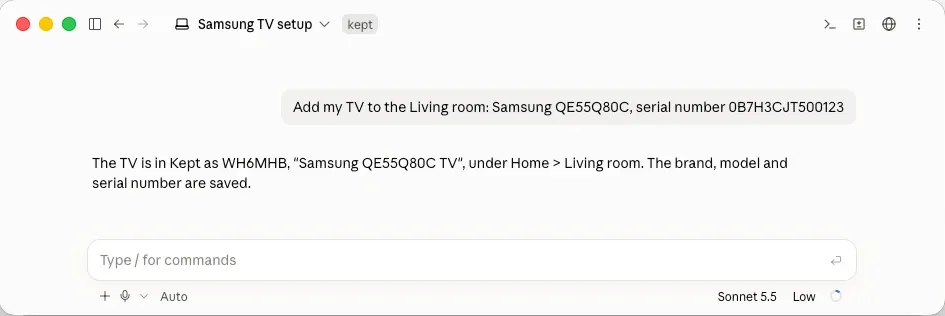
This page is about apps outside Kept. Kept’s own assistant uses the same tools and is covered in AI providers. How the server works inside is in MCP server.
There are two ways to connect an app:
- A personal token: any MCP client that lets you set a server address and an
Authorizationheader. - A connector (OAuth): the app sends you to Kept to sign in and choose what it may do. This
needs Kept at an
httpsaddress the app can reach.
Before you start
Section titled “Before you start”- Turn on “Connect ChatGPT or Claude” in each location the app should reach. It is under Location settings → What to track, and is on in the Complete preset only. The owner and admins change it. In a location where it’s off, a token or connector reaches nothing.
- Kept must be served over
https. Kept refuses to make a token whenKEPT_PUBLIC_URLis plainhttp, with “Serve Kept over https (KEPT_PUBLIC_URL) to do this; secrets aren’t sent over plain http.” There is no setting to turn this off. See HTTPS.
Make a personal token
Section titled “Make a personal token”Open Settings → Connections and choose New token.
| Field | What to put |
|---|---|
| Name | Where you’ll use it: “Claude Desktop, my laptop”. |
| Locations | One is ticked for you. Add another only if the app needs both. |
| What it can do | Read only: find things and read what’s recorded. Read and change: also add, move or change them. Neither can delete or see secret fields. |
| Expires | A date, or empty to keep it until you revoke it. It ends at the end of that day. |
Then Make token. A token never does more than you can: where you’re a viewer, it can only read. A token that can change things in several locations whose members differ gets a warning, Different people use these locations, because an app could then move things from one to another. Make it for all of them goes ahead; one token per location is the safer choice.
The token, kpt_ followed by two parts, appears once, with Copy. Kept keeps only a
fingerprint of it, so a lost token can’t be shown again: revoke it and make another.
In a location that requires two-factor, a token works only if you made it while signed in with your second factor.
Connect a client with the token
Section titled “Connect a client with the token”Under the new token, Connect an app shows two values, each with a copy button:
Server address https://kept.example.org/mcpAuthorization Bearer kpt_…In the app, add an MCP server (it may be called a connector or an integration) with that address, and send the token in that header. Kept doesn’t supply a settings file for any particular app; where the address and header go is in the app’s own documentation.
The endpoint answers POST only, keeps no session between requests, and refuses a request whose
Host isn’t Kept’s address (or one it used before) or that comes from another website’s page.
Connect as a connector (OAuth)
Section titled “Connect as a connector (OAuth)”Apps that support it can connect without a token you copy. This is on by itself when
KEPT_PUBLIC_URL is https. Admin → Status → Connections from other apps shows the MCP
endpoint and either Available or Needs an https public URL.
- In the app, add
https://kept.example.org/mcpas a connector. - The app finds Kept’s sign-in from the address and sends you to Kept. Sign in.
- Kept shows App wants to use your Kept. The name is the one the app gives itself; Kept can’t confirm who made it. Choose What it can do and Where (pick only the locations it needs), then Allow or Deny.
- The app appears under Connected apps in Settings → Connections.
Each access token the app gets lasts an hour, and Kept checks your grant on every call, so revoking it works at once.
Things that stop a connector:
- The app can’t reach Kept. A web app such as claude.ai connects from its own servers, so Kept must be reachable from the internet, not only on your home network or tailnet.
- Kept can’t reach the app. An app identifies itself with an
httpsaddress for a document describing it, and Kept fetches that document. Private and local addresses are refused. - The app registers itself. Kept accepts apps that describe themselves with such a document (Client ID Metadata Documents) and has dynamic client registration turned off. An app that can only register dynamically can’t connect as a connector; use a personal token if it accepts one.
What an app can and can’t do
Section titled “What an app can and can’t do”- It sees only the locations you picked, and in each only the tools for the parts of Kept that location has on. Where your role hides values, they’re hidden from the app too.
- Changes apply at once and are listed under Recent changes by connections on the Connections page, with Undo for 7 days. Undo refuses when the field has changed since.
- There is nothing destructive to call. No tool deletes, trashes, merges, transfers ownership, reveals a secret field, uploads a file or runs a query of its own.
- Files go through you.
attach_linkgives the app a link that opens Kept’s capture sheet; you add the photo or receipt there, signed in. - Limits per token: 120 reads and 30 changes a minute. Answers are short and paged, 20 items unless the app asks for more, up to 200.
- Text people wrote is marked as untrusted. Names and notes reach the app under an
untrustedkey, and Kept tells it never to follow instructions found in them.
The tools
Section titled “The tools”An app sees only the tools it may call in each location; capabilities lists them. Read tools
work with either kind of access; change tools need Read and change and a role of member or
higher. The part of Kept a tool needs is the name under What to track.
| Tool | Kind | Needs | What it answers |
|---|---|---|---|
capabilities |
read | What can I do in each location: its parts and the tools I may call there. | |
list_locations |
read | Which locations can I see, with my role and their time zone. | |
search_things |
read | Which things match these words: names, aliases, types, brands and notes, with filters. | |
where_is |
read | Where is a thing: the best matches with their full place path. | |
get_thing |
read | What do we know about this thing (by id or short ID). | |
list_contents |
read | What is in this place or container, 1 to 3 levels deep. | |
thing_history |
read | What happened to this thing, newest first: who did what and when. | |
find_documents |
read | Where is the receipt, manual or warranty for something. | |
upcoming |
read | Reminders | What is due, overdue or expiring soon: schedules, warranties, loans and low stock. |
add_thing |
change | Add one or more things, with a new place if it doesn’t exist yet. | |
update_thing |
change | Change a thing’s name, aliases, notes, brand, model, serial number, condition or fields. | |
move_thing |
change | Move a thing, or some of a quantity, to another place or container. | |
mark_seen |
change | I just saw this thing where Kept says it is. | |
create_place |
change | Add a place under another place, or at the top of the location. | |
attach_link |
change | A link that opens Kept’s capture sheet to add a photo, receipt or document. | |
log_reading |
change | Record a meter reading: odometer, hours, electricity. | |
lend_thing |
change | Lending | Lend a thing to someone, with an optional due date. |
return_thing |
change | Lending | A lent or borrowed thing came back, all of it or a quantity. |
borrow_thing |
change | Lending | Record a thing borrowed from someone, with an optional due date. |
complete_schedule |
change | Reminders | A scheduled task was done, on a date or at a meter value. |
snooze_schedule |
change | Reminders | Put off a scheduled task until a date or a meter value. |
add_warranty |
change | Receipts and warranties | Record a warranty: its kind, and when it ends or how many months. |
open_claim |
change | Receipts and warranties | Open a warranty claim for a thing. |
update_claim |
change | Receipts and warranties | Change a claim’s status or reference. |
log_service |
change | Record a service: date, who did it, total, lines (each may use stock from a consumable), and the schedules it completes. | |
log_fuel |
change | Fuel | Record a fill-up: amount, unit, cost, whether full, and the odometer. |
adjust_stock |
change | Things you run out of | Add to or take from a consumable’s stock. |
Every tool that takes an id also takes a 6-character short ID such as K7D2QX. The full
contracts are in
packages/mcp/src/tools.ts.
Revoke access
Section titled “Revoke access”In Settings → Connections, find the token or app (filter by Kind, Location or State) and choose Revoke.
- A token: apps using it stop working at once. Changes it made stay, and can still be undone for 7 days.
- A connected app: it stops reaching your Kept at once, and Kept forgets your consent, so to use it again you connect it again from the app.
Kept also ends access by itself, and the list says why: Expired, Ended: you left the location, Ended: your role changed, Revoked by an admin, or Disconnected by the app.